Requests
Use Request to add something you want to your library before its files are on disk. Search a metadata source, review the title and edition, and choose where it should go. Prismedia searches your configured indexers, sends a suitable release to your download client, and follows the transfer through import.
You need an administrator account or permission to request content. Administrators can grant request access to household members; members can request into their accessible libraries. Acquisition settings, plugins, and operational request activity remain administrator workspaces.
Before you search
An administrator sets up these three pieces before household members start requesting:
- Install and enable a metadata plugin that declares Search and Lookup ID support for the kind you want.
- Configure an acquisition profile and indexer/download-client settings under Settings → Acquisition.
- Add an enabled library root that scans the matching medium: books, videos, or audio.
| Piece | What it answers |
|---|---|
| Metadata plugin | Which title, edition, season, or album do you mean? |
| Indexer | Which downloadable releases are available? |
| Download client | Which service transfers the selected release? |
| Acquisition profile | Which release rules, destination, naming template, and import method should Prismedia use? |
| Watched library root | Where should the finished files live and how should they be scanned? |
Indexers and metadata sources have different jobs. Finding a title does not mean a suitable release is available. Supported connections include Prowlarr, Torznab, and Newznab indexers, with qBittorrent, Transmission, and SABnzbd download clients. Configure the connections you already use under Settings → Acquisition, then choose them in a profile that targets the appropriate library.
Keep download staging outside your watched roots. If the download client and Prismedia use different paths for the same files, follow the download-path example.
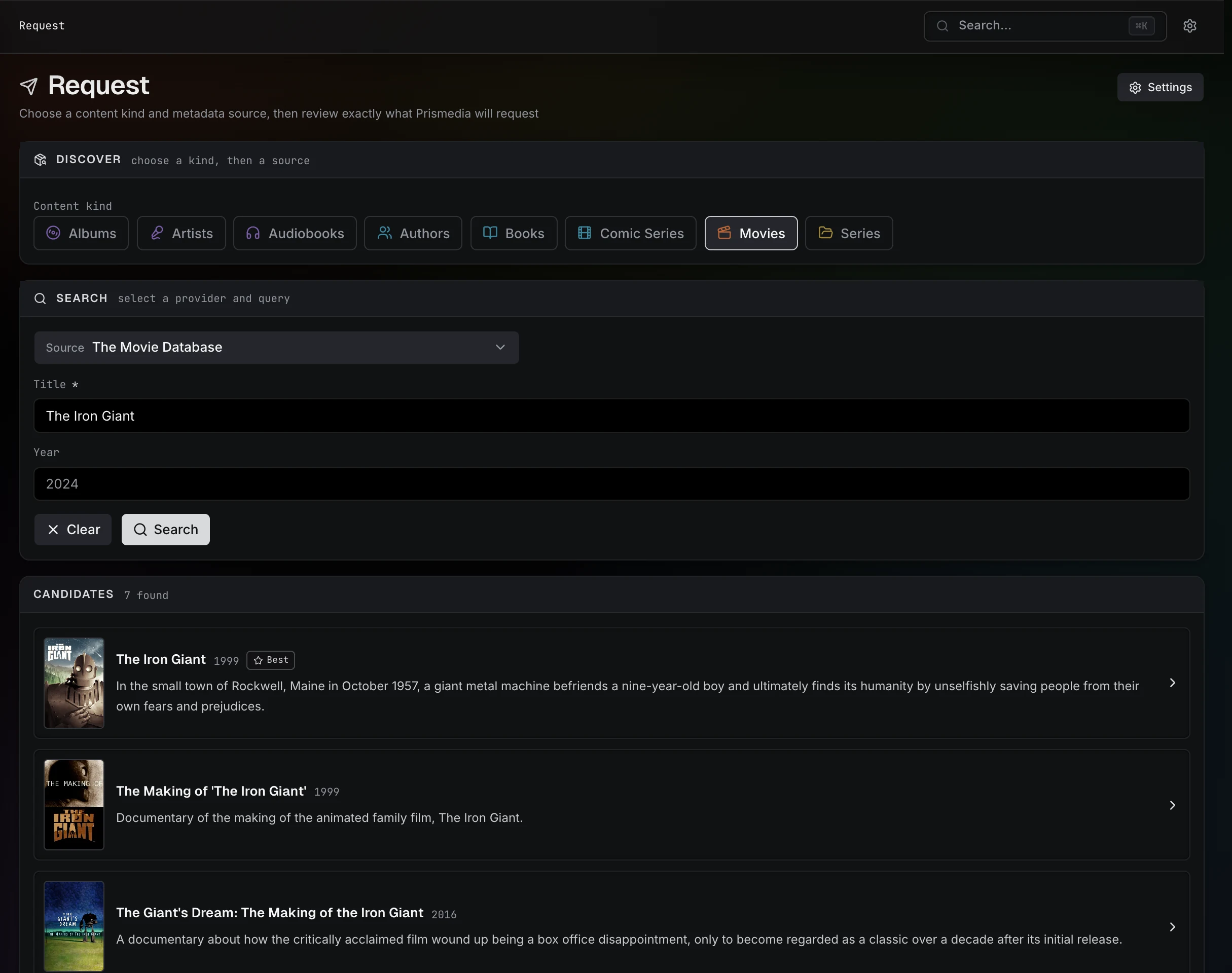
Plugins own their search schema. A TV source can ask for series title and year, while a book source can ask for title and author. Prismedia renders those declared fields instead of forcing every medium through one generic text query.
Make a request
In Discover:
- Choose a content kind.
- Choose one of the enabled plugins that supports that kind.
- Fill in the plugin's search fields and run the search.
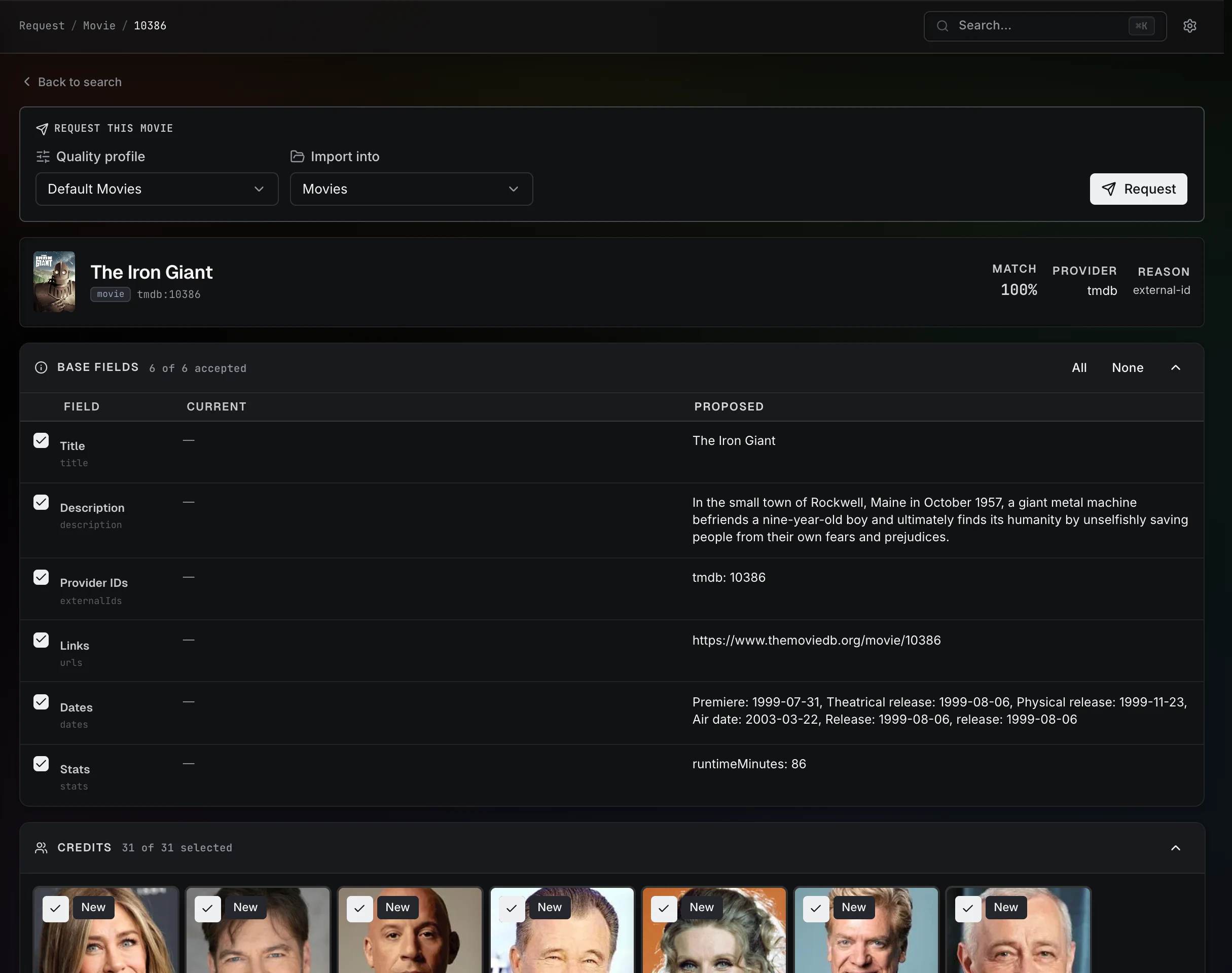
- Open a result to review its canonical metadata proposal.
For example, to request a film, choose Movies, select a metadata source, and search by title. Check the year and artwork in the result before continuing. This avoids requesting a remake or a different title with the same name.
The review is the same proposal-oriented experience used by Identify. It shows the metadata, artwork, relationships, and structural children the plugin supplied. Container results expose independently requestable children, so you can choose seasons, books, or albums instead of accepting an opaque all-or-nothing request.
Before committing, choose a compatible library root and acquisition profile. Container requests use the same medium-neutral policies everywhere: All current and future, Missing now, Future only, or Manual selection. The shared child picker applies them to seasons, books, albums, and future Entity hierarchies; the selected policy also controls whether newly discovered direct children begin acquisition.
NSFW visibility
Discover follows the app-wide NSFW preference. When NSFW content is hidden, Prismedia excludes plugins marked NSFW and asks the selected provider to omit adult results.
What happens after Request
Requesting content creates real fileless Entities immediately:
- A leaf such as a movie, book, episode, or album appears in its normal library grid as Wanted.
- A container such as a series, author, or artist is monitored, and the selected children are created beneath it using the same Entity hierarchy as on-disk content.
- Each acquisition keeps the target Entity ID, persistent plugin identity, profile, and import root.
- When import completes, Prismedia materializes the files onto that same Entity immediately; it does not wait for a later full-library scan to make the content ready.
The Entity's normal detail page is the management surface after commit. Its Acquisition section shows monitoring, release search, active transfer/import state, retry controls, and file-management actions.
Request workspace
The Request page also provides shared operational views:
- Downloads shows active transfers and imports.
- Missing shows monitored wanted content that still needs a release.
- Cutoff unmet shows owned content eligible for a quality upgrade.
- History shows durable acquisition events.
These views project the same acquisitions and Entities used by detail pages; there is no parallel request-detail model or external request database.
Removing or unmonitoring
Removing a wanted item tears down its in-flight acquisition before deleting the fileless Entity. Unmonitoring is authoritative at any level of the Entity hierarchy: Prismedia stops and removes active downloads, clears queued and pending/review/failed acquisition work, removes fileless descendants, and clears Wanted state from the source-backed Entities it retains. Turning off one child also prevents an All/Future parent from silently adding that child back. Verified on-disk files are removed only through an explicit Delete files action.
When a request does not become playable
| What you see | What to check |
|---|---|
| Request is unavailable | Check the account's request permission and accessible libraries. |
| No metadata source for a media type | Enable a plugin that supports Search and Lookup ID for that kind. |
| The title is found, but there is no compatible destination | Check the enabled root's scan type and the acquisition profile's destination. |
| The item stays Wanted | Check release availability and the profile's quality and matching rules. A metadata match alone does not supply a file. |
| Download finishes, but import cannot find its files | Check the reported download path, Docker mounts, remote path mapping, and permissions. |
| Import is waiting for review | Open the item's acquisition section and inspect the proposed file matches before continuing. |
For existing files, start with Your First Library & Scan. Requesting is for acquisition; it is not required to catalog media you already have.