Read and Listen to the Same Book
A book can contain both a readable edition and an audiobook. You open one library item, then choose how to continue. The native app also offers Continue Combined, which opens the reader and starts the audiobook near your saved book position when chapter alignment is available.
Put both editions in one title folder
Use a watched root with Books enabled and Audio disabled. Audio is the music scanner; the Books scanner handles audiobook files.
/media/books/                       ← watched root
└── Example Author/
    └── Example Book/
        ├── Example Book.epub
        └── Example Book.m4b
An EPUB or PDF and its audio files belong in the same title folder. Matching filename stems make the relationship clear. If names differ, keep exactly one readable edition in the folder so the match is unambiguous. For multiple audio files, use ordered names such as 01 - Beginning.mp3 and 02 - Journey.mp3.
Scan the root, then open the book. Check that it offers both reading and listening actions. If it appears twice, check the title folder and scanner settings before trying to join progress. See Organize Your Media Folders and the book scanning rules.
Start reading or listening
| Action | What it does |
|---|---|
| Read / Resume reading | Opens the readable edition at its saved reading position. |
| Listen / Resume listening | Starts the audiobook, with its audio parts in order and its saved listening position. |
| Continue Combined in the native app | Opens the reader and starts the aligned audiobook near the saved book position. Available when the book has a usable readable/audio chapter map. |
Reading and listening have their own saved positions. Combined continuation uses the relationship between chapters to move between formats; it is not a word-by-word transcript alignment. The exact match depends on the editions and their chapter structure.
Check the chapter map
Open the book's Chapter Mapping tab when both renditions are present. Prismedia stores automatic matches from the scan and distinguishes them from explicit choices you save.
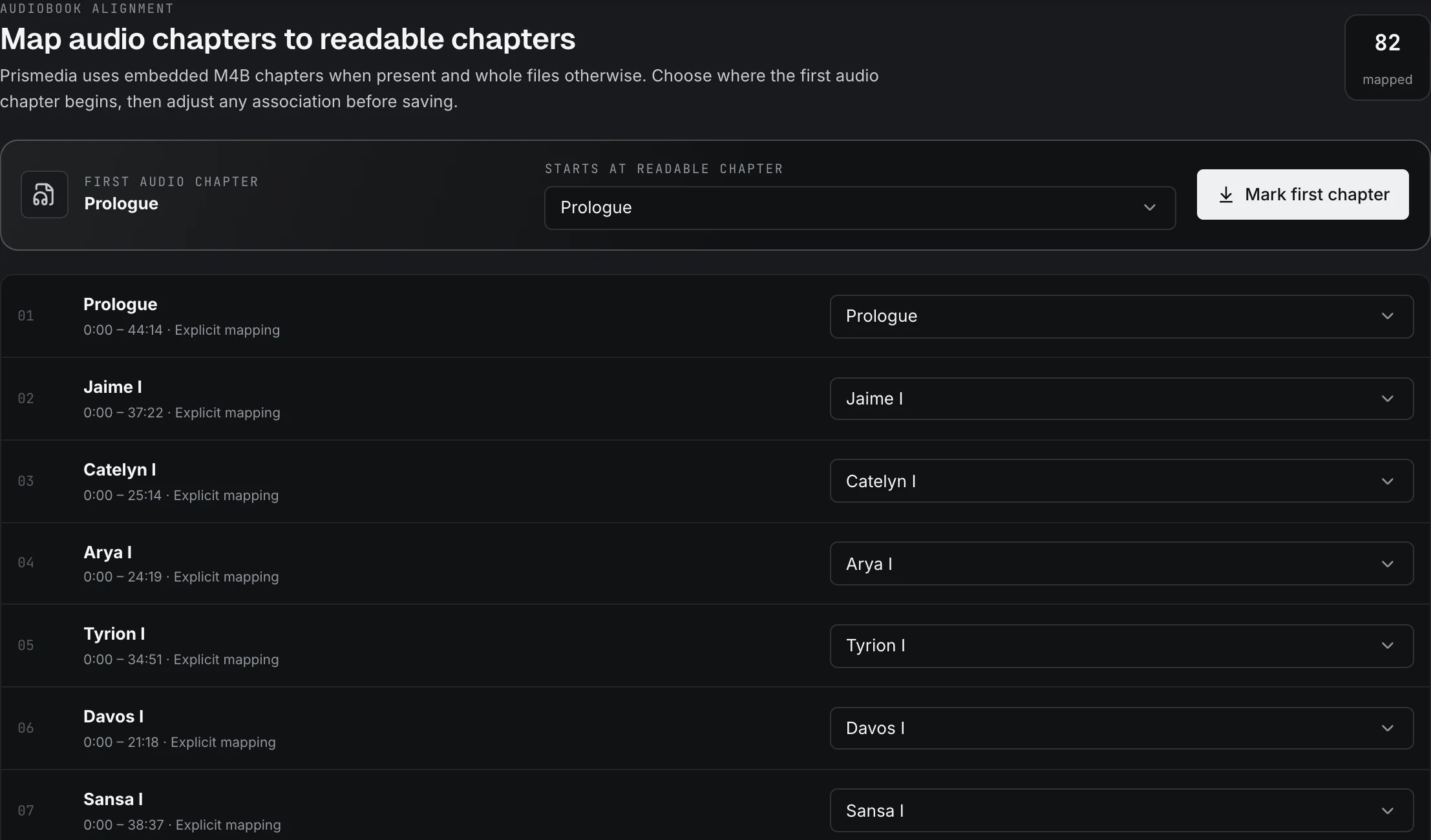
- Compare the readable chapter titles with the audiobook parts.
- If the audiobook starts after a foreword or other front matter, select the readable chapter where its first part begins, then choose Mark first chapter to fill the map in order.
- Correct individual rows when the editions split chapters differently.
- Save the map. Web and native clients use that saved alignment.
M4B files with embedded chapter markers can expose several audio chapters without splitting the source file. A file without useful chapter information may offer a less detailed map. A matching title does not guarantee that two editions have identical introductions, omissions, or chapter boundaries.
Continue in the native app
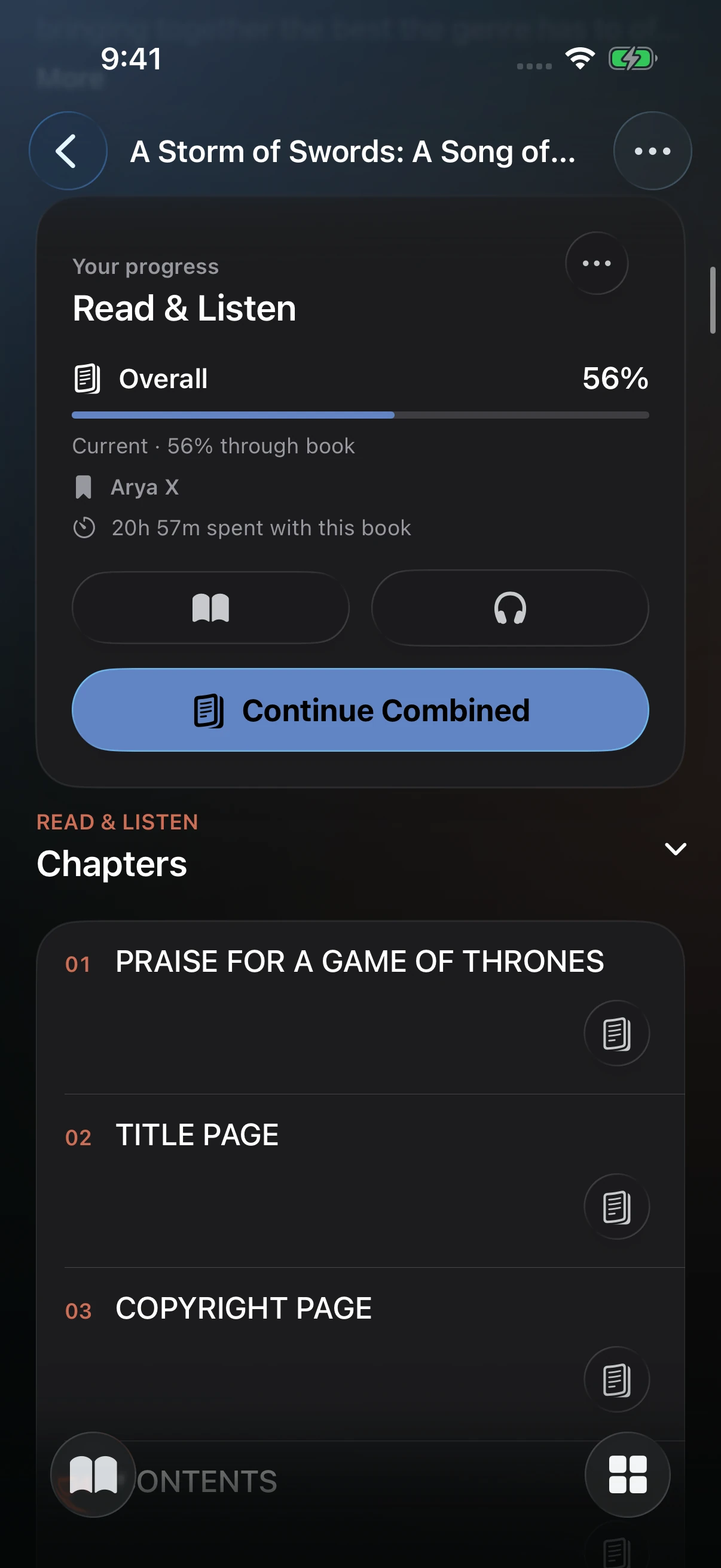
Open the book and find Read & Listen. Tap the book icon to continue reading or the headphones icon to continue listening. Choose Continue Combined to use the reader with audiobook playback. The combined action estimates the audio position within the mapped chapter and starts slightly before that point, giving you time to find the passage.
The reader's audiobook controls let you manage playback while the document remains open. For the reading appearance and focus controls, see Native Reader Settings.
If something does not line up
| What you see | What to check |
|---|---|
| Only a reading action | Confirm the audio files are in the same title folder, the Books scanner is enabled, and probing has finished in Jobs. |
| Only a listening action | Confirm a supported EPUB/PDF is present and belongs to the same scanned book. |
| Combined continuation is unavailable | Check that the book has readable chapters, audio durations, and usable chapter mappings. You can still read and listen separately. |
| Audio starts in the wrong chapter | Review front matter, chapter numbering, and explicit mappings; check that both files are the same edition. |
| Audio is close, but not at the exact sentence | Chapter-based estimation is approximate. Seek within the chapter to adjust your place. |
Sign in to the same server and account on each device to use the same library progress. See Connect the Native App.